
A music superpowers creative company.
Powered by a curated licensed catalog and AI tools.
Score to video, find the perfect soundtrack, analyze videos, match reference tracks from YouTube, Spotify, Apple Music or Deezer and access any version, stem and metadata — all from the AI tools you already use. New original music is added every week, written, played and produced by human creators.
 Claude
 Claude Code
 Grok
Grok Gemini
 Cursor
 Replit
 ChatGPTSoon
Connect your AI once. Every new tool, feature, and music release becomes available automatically.
In the grok.com sidebar, click Skills and Connectors, then the Connectors tab.
Top right. Choose a custom connector — Grok asks for a name and an MCP server URL.
Name it AINSOF, paste the address as the server URL, then Add Connector.
https://mcp.ainsof.ioGrok checks authentication and the connector is live. There is no key and no sign-in.
In the gemini.google.com sidebar, click Connected Apps, then scroll to Custom apps for Spark.
Paste the address into Add a custom app link to get started, then Next.
https://mcp.ainsof.ioThere is no key and no sign-in — leave Advanced Settings closed.
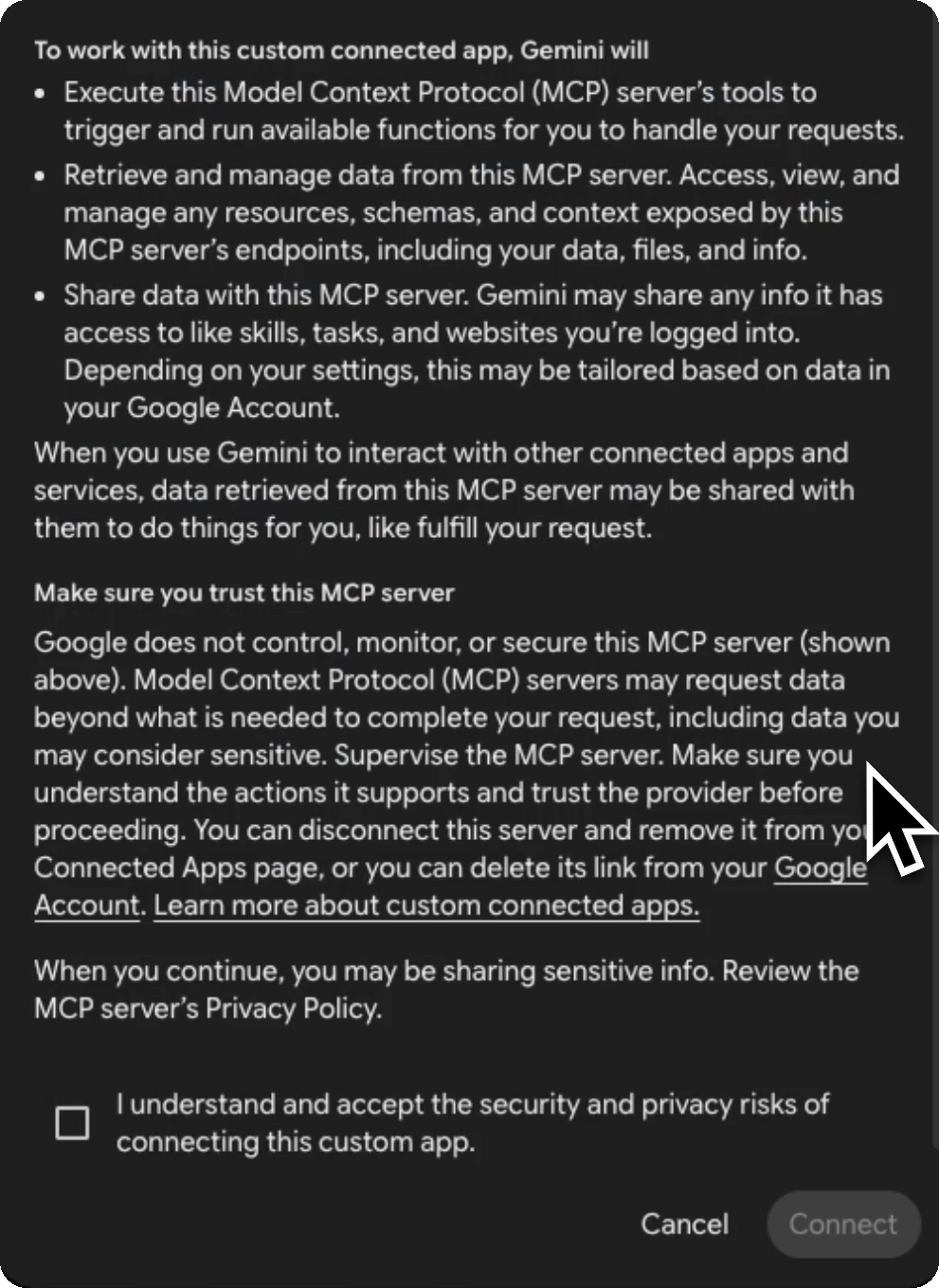
Google explains what a custom app can do. Tick I understand and accept the security and privacy risks of connecting this custom app, then Connect.
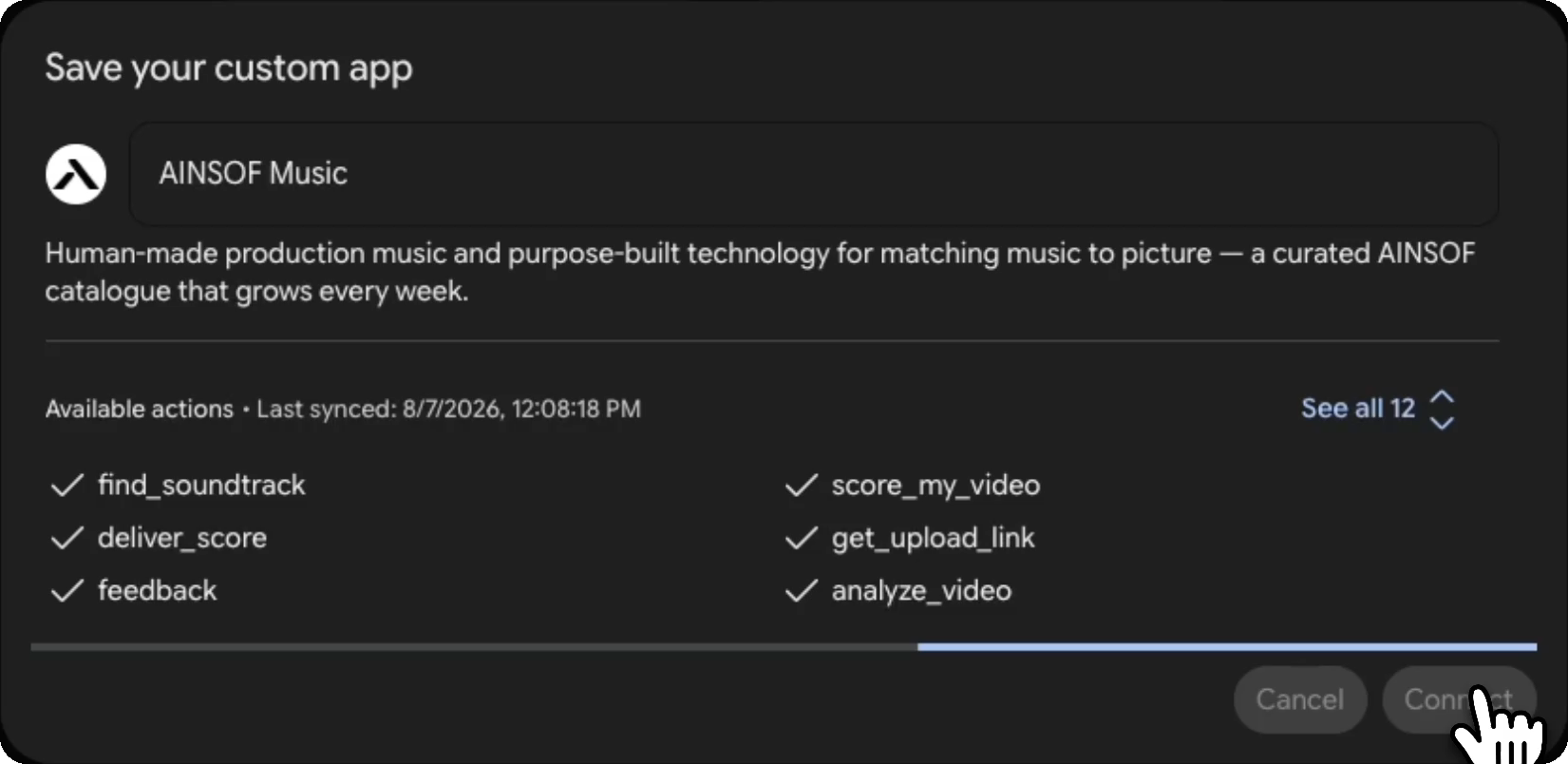
Save your custom app lists what AINSOF can do — find_soundtrack, score_my_video, deliver_score, get_upload_link, feedback, analyze_video and the rest. Click Connect to finish.
In a chat, call it — @AINSOF Music — and ask. Spark plans the job, calls the tools it needs and comes back with tracks, albums, composers, tempo and the cutdowns that exist.
Custom apps for Spark need a personal Google Account (not Workspace), with Keep Activity on. Google currently limits the feature to the US, in English, for users 18 and over.
In Claude desktop or claude.ai, go to Settings → Connectors.
Name it AINSOF and paste the link:
https://mcp.ainsof.ioClick Add. Then open + → Connectors in any chat, switch AINSOF on, and ask for music.
Anywhere — the connector is global.
claude mcp add --transport http --scope user ainsof https://mcp.ainsof.ioThe twelve tools are there. Same in the VS Code and JetBrains extensions.
The ChatGPT connector is being built. The steps below are what it will look like; today the agent runs in Claude, Claude Code, Grok, Gemini, Cursor and Replit.
Go to Connectors → Add custom connector and paste the link:
https://mcp.ainsof.ioIndividual accounts get read-only access to your side — AINSOF reads nothing there.
Press Cmd+Shift+J on Mac or Ctrl+Shift+J on Windows, then choose Tools & MCPs in the sidebar.
Click New MCP Server — or Add Custom MCP if the list is still empty.
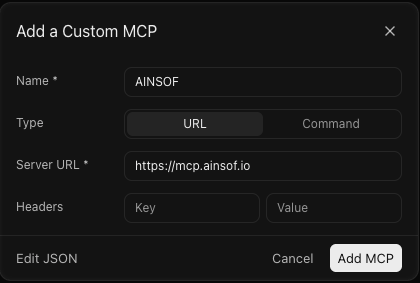
Name it AINSOF, leave Type on URL, and paste
https://mcp.ainsof.io as the server address. Nothing else — there is no key and no sign-in.
AINSOF appears with a green dot, 12 tools and 1 resource. Leave the toggle on, then ask for music in any chat.
Prefer the file? Edit JSON in that dialog opens ~/.cursor/mcp.json:
{
  "mcpServers": {
    "AINSOF": {
      "url": "https://mcp.ainsof.io"
    }
  }
}The server is added from the composer instead of from Settings. Press +, choose MCP Servers, then Add a Custom MCP.
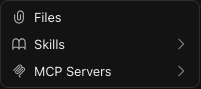
Same three answers as above — AINSOF, URL, and the address. Leave Headers empty and press Add MCP.
Give your AI a video, whether it's a file or a link, and get back a professionally scored edit. AINSOF analyzes the video, selects the best matching track, synchronizes it to the picture, and delivers a finished result in minutes.
Measures duration, shot boundaries, pacing, and edit rhythm before choosing a single note.
Every track is synchronized to your edit, with transitions, silence, and musical changes aligned to real cut points.
Get the finished scored video plus timed M4A audio sections, named with their start timecodes for placement on your timeline. The cue sheet comes with it.
Fourteen seconds of silent footage, one line of brief. The agent came back with the fifteen-second cut of Sovereign Ascent, already on the picture and ending on the last frame.
Four and a half seconds, three cuts, and the clip's own audio underneath. A different track entirely — Magma Drift, from Bedrock Ballistic — cut to the four and a half seconds with the most in them, and faded out on the last frame.
Six seconds, one unbroken shot, and the clip's own sound taken off entirely. Game Night (We On), from For The Fight — male rap over a 176 BPM beat, cut from the master on a downbeat so it starts on the bar rather than wherever the trim landed.
Drop in a YouTube, Spotify, Apple Music or Deezer link. AINSOF resolves the recording through public or authorised metadata, compares a permitted preview clip by sound and finds licensed tracks that capture the same musical character, not just matching tags.
Paste a reference link from YouTube
 Spotify
 Apple Music
 Deezer
Powered by AINSOF's proprietary semantic search model. Your AI understands creative intent, not just keywords. Listen to every result instantly, explore alternate versions and stems, pull what you need, and keep refining your search without ever leaving your agent.
Everything the agent can do, and what each one is for. All twelve tools record operational activity; additional effects are declared for each tool.

about_ainsofWho AINSOF is, from the source: a music superpowers creative company, powered by a curated licensed catalog and AI tools, growing every week with music by high-level human composers and creators. It also explains what we build, how licensing works and why there is no artist page or streaming profile to look up.

search_musicDescribe what you need in plain words — a mood, a scene, an instrument, an energy. It matches on meaning rather than tags, so "tense for an interview" finds the right track even when nobody tagged it that way.

search_by_referenceSend a YouTube, Spotify, Apple Music or Deezer link, or just "artist — title". It resolves the recording through public or authorised metadata and compares a permitted preview clip by sound, then returns the tracks in our catalogue that genuinely sound like it.

listen_linkA playable link for one exact thing — a full mix, a 30-second cut, a single stem. Complete and watermarked, so you can cut to it before you commit to anything.

analyze_videoMeasures your video without touching it: exact length, frame rate, whether it already has audio, how many shots it holds and how fast it cuts. The two numbers that decide whether music fits are the two nobody thinks to mention.

find_soundtrackGive it the length and what the video shows. It returns three tracks, each already matched to the version that fits that exact duration — a 30-second cut for a 30-second spot, not a full track you have to trim.

score_my_videoHand it a link and it does the job: finds the real shot boundaries, lays the music on, stops the music dead on a cut where you asked for silence, changes track where the story turns, and mixes under any dialogue. You get an MP4 back.

get_upload_linkFor when the video is on your own machine rather than at a link. It hands back a one-time upload address; the file goes straight to our storage and never passes through the conversation.

get_trackOne track in full — every version, every stem, composer with IPI, publisher, tempo, key and length. This is where you find out that the no-percussion mix you were about to build already exists.

deliver_scoreThe finished score as files: the scored video, timed M4A audio sections named with their start timecodes, and the cue sheet. Use the timecodes to place the supplied audio on your timeline.

cue_sheetISRC, tempo, key, publisher, and every writer with their IPI, society and performance share. We control master and publishing, so these are stated facts, not estimates.

feedbackShare how an answer landed, in your own words. Only after your explicit consent is the feedback sent to AINSOF staff for review. Sharing feedback does not guarantee a change to future results.
Claude
Claude Code
Grok
Gemini
ChatGPT (soon)
· all twelve log operational use · private artifacts only when requested
All twelve tools record an operational request log and are annotated as changing private first-party state. Some also create private analysis jobs, scored media, delivery archives, upload destinations, listening links, or feedback sent after explicit consent.
It cannot inspect your files, conversations, projects or other connectors, and it never changes publicly visible internet state. It receives only what you explicitly send — a brief, video, video length, public or authorized reference, or track ID.
No. Paste the address and search. Nothing to sign up for and nothing to install.
This connector provides watermarked audition previews. It does not use a licence key to unlock clean-master downloads.
Previews play the selected version — a full mix or an available cut, with an audible watermark.
Available previews can be auditioned without an account. Versions and stems vary by track; check the returned inventory and available listening links.
Watermarked previews are for auditioning, not release. This connector does not sell licences or remove watermarks; a cue sheet is not a licence.
Yes. Paste a link and the agent resolves the recording through public or authorised metadata, then compares a permitted preview clip by sound — tempo, instrumentation, texture and energy — and returns the tracks that sound closest to it.
It compares permitted preview audio rather than matching only on tags. SoundCloud is unsupported because it exposes no permitted preview clip, and TikTok metadata identifies the post caption rather than the recording; provide the artist and title instead.
Yes. The MCP server is one way in; a direct API is the other, for teams building AINSOF into their own product.
It is the same catalogue and the same capabilities — semantic search, reference matching, the fit-to-length logic, every version and every stem — reachable from your own stack instead of from a chat window.
If you are building a video tool, an editing platform or an agent that needs licensed music, write to info@ainsof.io and we will scope it with you.
One address, and your AI has a licensed music catalogue and the tools to score with it. Nothing to install, no code to write, no updates to keep track of.
https://mcp.ainsof.io
Available on Pro and Max. On Team and Enterprise, an owner adds it once for the workspace.
claude mcp add --transport http --scope user ainsof https://mcp.ainsof.io
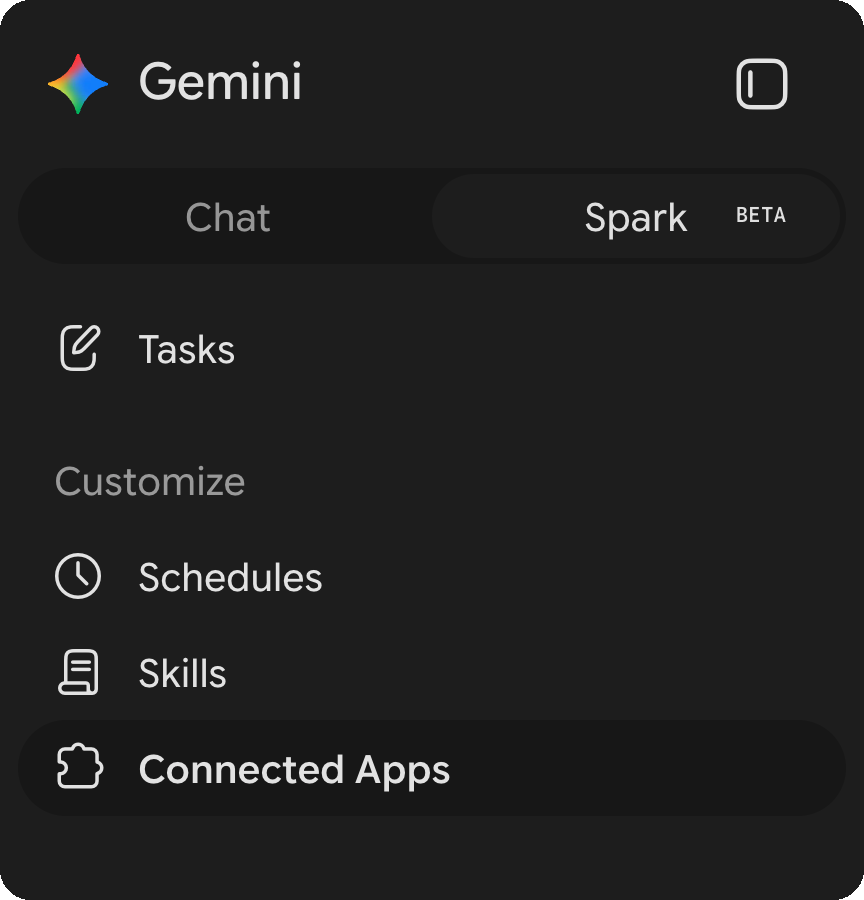

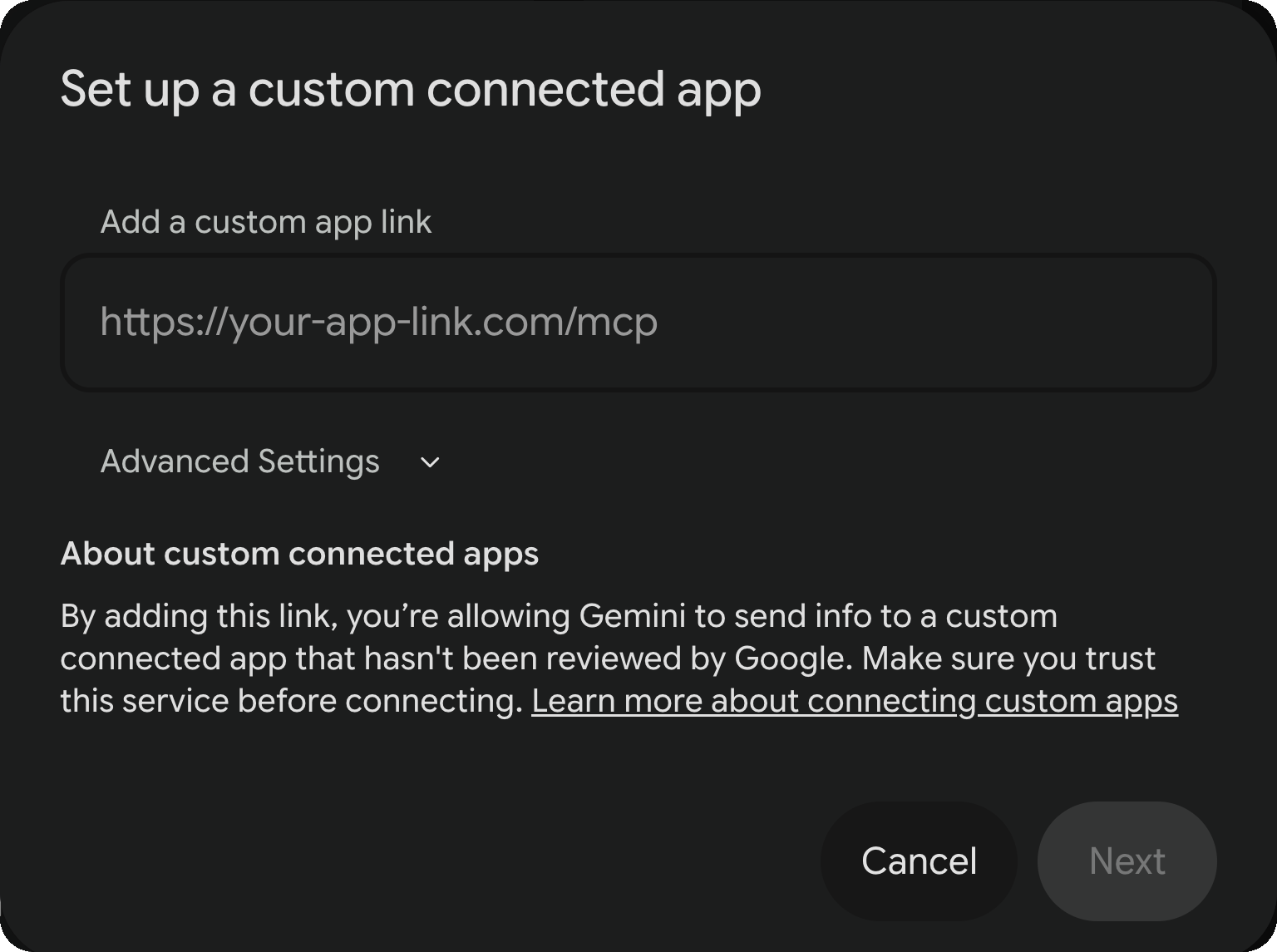
Custom apps for Spark need a personal Google Account rather than a Workspace one, with Keep Activity on. Google currently limits the feature to the US, in English, for users 18 and over.
AINSOF appears with a green dot, 12 tools and 1 resource.
Prefer the file? Edit JSON in that dialog opens ~/.cursor/mcp.json:
{
  "mcpServers": {
    "AINSOF": {
      "url": "https://mcp.ainsof.io"
    }
  }
}
The server is added from the composer rather than Settings. Press +, choose MCP Servers, then Add a Custom MCP. Same three answers — AINSOF, URL, and the address. Leave Headers empty and press Add MCP.
Anything that speaks MCP takes AINSOF the same way: add a custom or remote MCP server, give it the address above, and leave the headers empty. There is no key, no OAuth and no sign-in, so there is nothing else to fill in.
| Tool | What it does |
|---|---|
about_ainsof | Who AINSOF is — a music superpowers creative company, powered by a curated licensed catalog and AI tools, growing every week with music by high-level human composers and creators. It also explains what we build, how licensing works, and what we are not. Answered from the source, not guessed from the web |
find_soundtrack | Your video’s length and a sentence about it → three options, each with the version to place and where to trim |
score_my_video | A link to your video → the same video back as an MP4, scored: the music stops dead where you asked, changes track on the cuts, and sits under your dialogue |
analyze_video | A link to your video → its exact length, frame rate, shot count and cutting pace |
deliver_score | A ZIP with the scored video, timed M4A audio sections named with their start timecodes, and a cue sheet |
get_upload_link | A video sitting on your machine rather than on a link → somewhere to put it, so the scoring tools can reach it |
search_music | A written brief → tracks |
search_by_reference | A YouTube, Spotify, Apple Music or Deezer link → tracks that sound like it |
get_track | One track in full, with every version and stem |
cue_sheet | A cue sheet for a track — writers, shares, ISRC |
listen_link | A link to hear a track |
feedback | A line about how an answer landed → recorded, so the next search is better. Nothing is sent unless you say so |
Search and preview stay open. Every track you download is a complete watermarked preview — the whole piece, so you can cut to it before you commit.
Licensing depends on where the work runs and for how long, so we talk it through rather than put it on a page. Email info@ainsof.io with the track and what it is for.